The following example is provided to give a general idea of what is meant by the term “flat file” (columns contain data elements and rows contain complete records of individual observations). But it is important to understand that there is a lot of flexibility in the details, for example the columns present and their order, the presence of a header row, etc.
|
Well ID |
Date |
Flag |
Result |
MDL |
Units |
CAS# |
Parameter |
|
MW-11 |
9/28/1990 |
|
7.6 |
n/a |
SIU |
010-29-7 |
pH |
|
MW-11 |
9/28/1990 |
|
1700 |
n/a |
mg/1 |
16887-00-6 |
Chloride |
|
MW-11 |
9/28/1990 |
ND |
0.1 |
0.1 |
mg/1 |
14797-55-8 |
Nitrate |
|
MW-11 |
9/28/1990 |
|
210 |
n/a |
mg/1 |
14808-79-8 |
Sulfate |
|
MW-11 |
9/28/1990 |
|
3900 |
n/a |
mg/1 |
10-33-3 |
TDS |
|
MW-11 |
12/19/1990 |
|
1300 |
n/a |
mg/1 |
16887-00-6 |
Chloride |
|
MW-11 |
12/19/1990 |
|
6.7 |
n/a |
mg/1 |
14797-55-8 |
Nitrate |
|
MW-11 |
12/19/1990 |
|
6.4 |
n/a |
SIU |
010-29-7 |
pH |
|
MW-11 |
12/19/1990 |
|
270 |
n/a |
mg/1 |
14808-79-8 |
Sulfate |
|
MW-11 |
12/19/1990 |
|
3360 |
n/a |
mg/1 |
10-33-3 |
TDS |
|
MW-17 |
10/24/1990 |
H |
1600 |
n/a |
mg/1 |
16887-00-6 |
Chloride |
|
MW-17 |
10/24/1990 |
H |
0.6 |
n/a |
mg/1 |
14797-55-8 |
Nitrate |
|
MW-17 |
10/24/1990 |
H |
7.15 |
n/a |
SIU |
010-29-7 |
pH |
|
MW-17 |
10/24/1990 |
H |
360 |
n/a |
mg/1 |
14808-79-8 |
Sulfate |
|
MW-17 |
10/24/1990 |
H |
3800 |
n/a |
mg/1 |
10-33-3 |
TDS |
|
MW-17 |
12/19/1990 |
H |
1800 |
n/a |
mg/1 |
16887-00-6 |
Chloride |
|
MW-17 |
12/19/1990 |
H |
6.7 |
n/a |
mg/1 |
14797-55-8 |
Nitrate |
Figure 2.1: Example of Flat File Translatable Format
The flat file should be an ASCII text file (i.e. NOT in .xls format or other binary formats) and should be tab- or comma-delimited. If the flat file is in binary format, is space delimited or contains fixed-length fields, it should be reformatted to a tab- or comma-delimited text format before running the Sanitas importer (most spreadsheets can reformat various data files to tab- or comma-delimited files).
The flat file should contain at least the following fields, in any order:
The flat file may contain the following optional fields:
Any additional fields will be ignored by the translator.
The Sanitas Data Translator is flexible, and will alert you to any improprieties in your data. We suggest you try translating your data before you worry about the details below.
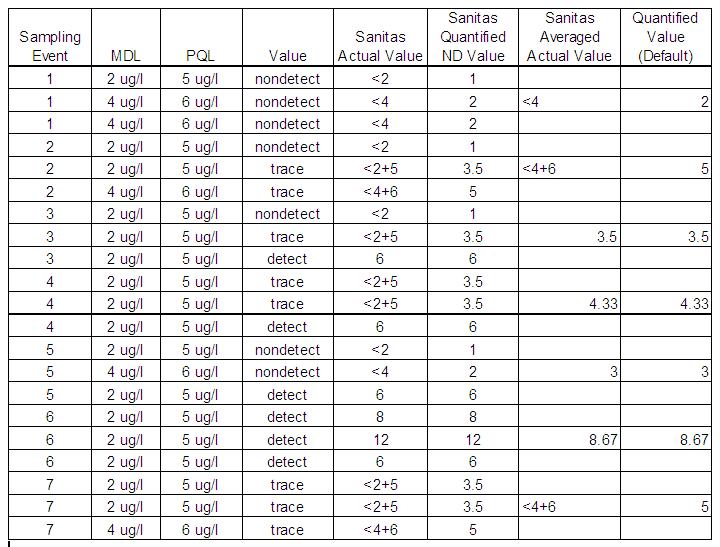
The Sanitas Data Translator averages multiple values for the same date/well/constituent. When Sanitas encounters duplicate (triplicate or quadruplicate) values that are categorically different with regard to quantitation, the component values are averaged in the following manner:
The following examples illustrate how Sanitas interprets these sets of sampling event values, assuming the <MDL+PQL trace syntax is selected and no non-default Alternate Reporting Limits behavior is in use:
Figure 2.2: Example of How Sanitas Interprets Sets of Sampling Event Values